
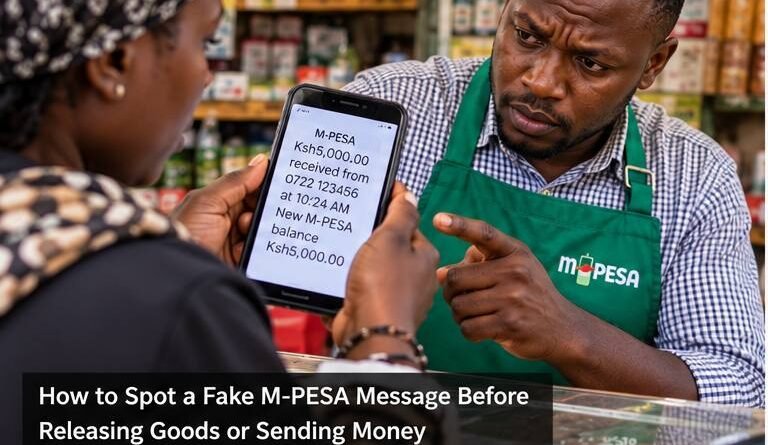
How to Spot a Fake M-PESA Message Before Releasing Goods or Sending Money
A convincing M-PESA message on somebody else’s phone is not proof that you have been paid. Before releasing goods, giving change or sending money back, confirm the transaction from your own M-PESA records.
Fake and old M-PESA messages remain a recognised fraud method. Safaricom’s fraud-awareness guidance specifically lists fake or old M-PESA messages among common scams and advises customers to check their M-PESA balance when they are unsure whether a transaction succeeded.
1. Check your own phone, not the customer’s screen
A buyer may show you a screenshot or an SMS that appears to confirm payment. That evidence is under the buyer’s control. Your first check should be whether the transaction appears on your own account.
Do not release goods merely because the sender says the network is delayed. If you cannot independently confirm payment, pause the transaction until you can.
2. Check the M-PESA confirmation and your balance
Safaricom advises users to check their M-PESA balance when unsure whether a transaction was successful. Merchants should also use the transaction records available through their official M-PESA business tools where applicable.
A genuine transaction should be verifiable from the receiving side. A screenshot cannot replace that check because screenshots and ordinary text messages can be altered.
3. Know where genuine M-PESA SMS messages come from
Safaricom’s fraud guidance states that M-PESA confirmation messages come from MPESA, not from an ordinary mobile number. Be suspicious if a supposed confirmation arrives as a normal message from a personal phone number.
However, the sender label alone should not be your only test. Always confirm the actual transaction in your account.
4. Beware of the fake overpayment trick
A common pattern is for a fraudster to claim they accidentally sent more than the purchase price and ask you to refund the difference. If the original payment never arrived, sending a “refund” means you are transferring your own money to the scammer.
Verify the original transaction first. Never refund money based solely on a message shown by another person.
5. Do not follow reversal instructions from strangers
Safaricom also warns about fake reversal instructions. A caller may claim to have sent money accidentally and pressure you to dial a code, enter a PIN or transfer funds.
Do not follow codes dictated by an unknown caller. Safaricom warns that doing so can expose you to fraud or interfere with your line.
6. Never disclose your M-PESA PIN
Your PIN should remain secret. A legitimate customer, buyer or person seeking a reversal does not need it. Safaricom also advises customers not to disclose M-PESA balances, PINs or other personal information to callers.
If you believe someone has learned your PIN, change it immediately through the official M-PESA process.
7. Use Hakikisha before you send money
Hakikisha allows M-PESA customers to see the intended recipient’s name before completing a transaction. Safaricom says the feature is available through M-PESA channels including the app, mySafaricom, *334# and the SIM Toolkit.
Read the displayed name instead of clicking through automatically. This is particularly important when paying a new number or responding to an urgent request.
8. Verify urgent requests from people you know
Scammers sometimes take over WhatsApp, Facebook or other accounts and then ask the victim’s contacts to send money. If a friend suddenly asks for an urgent M-PESA transfer, verify the request using another trusted method, such as calling a number you already know.
Do not rely on the same compromised chat to confirm the request.
9. What should a shopkeeper do before releasing goods?
- Check for the transaction on the receiving M-PESA account or merchant system.
- Confirm the amount is correct.
- Confirm the transaction details correspond with the sale.
- Do not rely on the buyer’s screenshot.
- If confirmation is unavailable, wait rather than guessing.
These few seconds can prevent both loss of stock and loss of cash.
10. How to report suspicious activity
Safaricom’s fraud-awareness material says suspicious activity can be reported through its official channels, including SMS to 333. Include useful details such as the number involved in the suspicious request.
If you have already lost money, preserve messages, transaction codes, phone numbers and other records. Contact Safaricom promptly and consider making a police report where appropriate.
Red flags that deserve an immediate pause
- The person is rushing you to release goods before you confirm payment.
- They show only a screenshot on their own device.
- The supposed M-PESA message came from an ordinary mobile number.
- They claim to have overpaid and demand an immediate refund.
- They ask for your PIN, balance or verification information.
- They instruct you to dial an unfamiliar code.
Bottom line
The safest rule is simple: verify money from your side before acting. A message can be copied, edited or reused, but the receiving account provides the evidence that matters to you.
For businesses, make verification part of the checkout routine rather than something done only when a customer looks suspicious. Consistent procedures protect both customers and staff.
Sources and verification
This guide was independently prepared using Safaricom’s official fraud-awareness guidance on fake or old M-PESA messages, fake reversal instructions, suspicious-activity reporting and Hakikisha.
Official M-PESA safety information
Safaricom advises customers to check their own M-PESA balance and transaction record when confirming payment. Use its current M-PESA information and fraud guidance for the latest customer steps.
